Building a Content System
for Educators

Project type
Content Strategy & Information Architecture
Team
Lead Content Designer · Content Team · Product Manager · Lead Designer · Marketing · Engineering
Timeline
V1 · Launched July 2026
Tools
Figma · Pendo · Google Docs · Crafter CMS · Confluence · Jira · Slack
Role
Lead Content Designer
Content Deliverables
Information Architecture · Content Taxonomy & Metadata · Content Patterns · Articles · Videos · In-Product Guidance · Terminology · Pendo Experiences
Setting the Stage
From content library to content experience
Educators using Encourage need more than a place to find help. They need to find information quickly, understand how it applies to them, and know where to go next.
While the existing library in the Encourage student app provided some relevant information, it was written for students. The educator experience needed to support a much broader range of content, including how to get started with Encourage, launch learning modules and lessons, support students, interpret reports, and troubleshoot technical issues.
The challenge wasn't simply creating more content. It was creating a content experience that could grow without becoming a collection of disconnected resources.
About the Resource Center
The Resource Center was designed to give educators one place to browse, search, save, and access college and career resources that support their work with students.
It included articles and videos about:
-
Getting started with Encourage
-
Launching and managing programs
-
Supporting students
-
Technical support
-
Learning Hub resources
-
Reports and student data
-
Program implementation

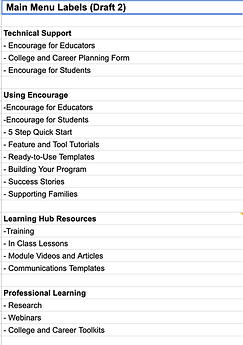
Educators could browse by topic, search across content, save resources, and move between related information.
The Resource Center needed to give authors a flexible way to organize content, create collections, build navigation, and tag resources, while giving educators a consistent experience no matter what type of content they encountered.
I worked closely with the Lead Designer across these experiences, contributing the content structure, patterns, terminology, and user-facing content while the visual and interaction design developed alongside it.
I also authored and/or edited the content that populated the Resource Center, including articles, videos, supporting copy, and in-product guidance.
The Resource Center brought together product guidance, program resources, technical support, and professional development in one experience.

Mapping the content experience
Early Figma explorations showing how content types, navigation, search, saved resources, and reusable content sections could work together.
The Challenge
More content doesn't automatically make an experience more useful.
Without a clear structure, even well-written resources can be hard to find, hard to understand, or hard to connect to the user's next step.
I needed to help create a content system that could answer several questions at once:
-
How should content be organized?
-
How should related resources connect to one another?
-
How do we make content consistent without making it repetitive?
-
How do we keep product terminology accurate across a growing body of content?
-
And how do we build something that can support future content experiences?
Additional constraint: Timing
While the CMS and backend were being built, I continued developing and refining the content that would eventually populate the experience. The content system and the content itself had to evolve together.
Discovering the Problem
The problem wasn't a lack of content. It was a lack of relationships.
As I reviewed existing resources and developed new ones, several patterns emerged.
Educators often need information in context. A resource about a specific grade level may make more sense when connected to an overview. A technical question may need to point back to the product experience. A feature explanation may need to distinguish between what the product does and what an educator actually needs to know.
The content couldn't be treated as a series of independent pages.
I began thinking about the Resource Center as an ecosystem of connected information. That changed how I approached everything from article structure and taxonomy to terminology, cross-linking, and in-product guidance.

Designing the Experience
1. Creating a clear content hierarchy

Designing relationships between resources

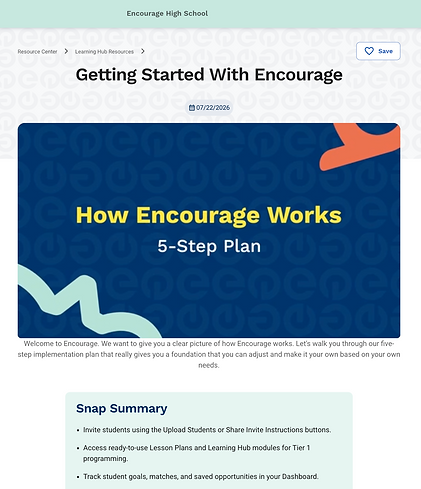
Suggested article
Bottom of article
Pointing educators toward related resources
One of the first problems was determining how individual resources could work both independently and as part of a larger experience.
For example, figuring out how to connect content in the Encourage student app with the grade-specific resources in the educator platform.
Rather than treating each article as a standalone page, I created a structure that allowed educators to understand the larger experience and then move into the information most relevant to them.
Each article could:
-
Stand on its own as a search result
-
Clearly communicate what the resource covered
-
Connect back to the larger experience
-
Point educators toward related resources
-
Follow a predictable structure
This created intentional relationships between resources rather than simply placing related articles next to one another. The goal was to make the content easier to enter, understand, and navigate.

Reusable content patterns
2. Designing a flexible content system
The Resource Center needed to support more than one type of content experience. Educators might need a quick article, a downloadable resource, a video, or a curated collection of related content. Authors needed to be able to create and organize those experiences without redesigning the interface each time.
Working closely with the Lead Designer and the rest of the Content Team, I helped define the content patterns that would support those different experiences. I mapped how content could appear across homepage sections, category views, individual articles, and video experiences, while establishing consistent patterns for:
-
Content cards and metadata
-
Headings and descriptions
-
Article and video relationships
-
Downloadable-content indicators
-
Saved-content interactions
-
Related resources
-
Calls to action
-
“Show More” and list-view experiences
-
Content descriptions and metadata
The goal wasn't to make every resource look identical. It was to give the system enough structure that authors had flexibility while educators experienced consistency.

One system, two audiences
Authors needed flexibility to curate and organize content; educators needed a predictable way to discover and use it.

3. Creating a scalable content structure
The experience also needed a consistent editorial foundation. As I authored and edited the content going into the Resource Center, I established reusable patterns for how resources were structured, including:
-
Introductions
-
Headings and subheadings
-
Instructional steps
-
Supporting explanations
-
Summary bullets
-
Conclusions
-
Calls to action
-
Related resources
-
Metadata and descriptions
I also organized content into meaningful relationships and groupings rather than treating each resource as an isolated asset.
For example, I organized content around product guidance, Learning Hub resources, technical support, and program implementation.

1. Clear title and hierarchy
Helps users scan before committing to the full article.
2. Action-oriented steps
Makes content easier to follow.
3. Related resources
Clear taxonomy that creates a path to the next piece of information.


4. Making terminology part of the experience
In a product with dozens of features, states, and workflows, inconsistent terminology can create friction on its own. I helped define, refine, and consistently apply product terminology across the Resource Center and related product experiences, including:
-
My Students
-
Learning Hub
-
My Modules
-
Lesson Plans
-
Reports
-
Student Groups
I also worked with product and student statuses, including: Draft, Active, Complete, On Track, Off Track, and In Progress. When terminology didn't accurately represent product behavior, I challenged it. For example, when describing a student being reconnected to an educator, “start fresh” suggested that the student was beginning again. The actual product behavior was different, so I used language that communicated that the student would be treated as a new connection.
I also maintained a formal terminology database/glossary and worked with Product and Engineering when language needed to reflect the actual system behavior.
5. Connecting content to the product
The Resource Center wasn't intended to be an isolated help destination. I worked with the product team to connect in-product guidance with deeper resources so educators could get the right amount of information at the right moment.
For example, I wrote Pendo experiences and onboarding guidance that introduced educators to concepts like:
-
Allowlisting Encourage emails
-
Inviting students
-
Learning Hub resources
-
Understanding My Students
-
Using Encourage Report
When educators needed more information, those experiences led them into deeper Resource Center resources.
This created a path from:
Product → guidance → deeper information → next action
It didn't ask educators to figure out where help lived on their own.

Testing & Iteration
Designed with ongoing measurement in mind
Success criteria included Pendo engagement data and educator feedback through surveys, interviews, and Pendo polls. The feature is still too new to have any substantial data, but early reviews are positive!
While engineering and CMS work continued toward launch, I continued developing and refining the content system, writing and editing resources, organizing related content, refining terminology, and building connections between the Resource Center and the product.
I also worked with Product, Design, Marketing, and Engineering to make sure the content reflected the experience being built and how the product actually worked. The result was an iterative process where content, design, and product behavior evolved together.
Building the foundation for a larger content ecosystem
The Resource Center launched in July 2026, giving educators a centralized experience for finding resources across product guidance, program implementation, technical support, and professional development.
More importantly, V1 established a reusable foundation for future content experiences.
The content and structure created for the Resource Center could support future directions including:
-
More personalized content experiences
-
Role-based resource discovery
-
Expanded Help Center experiences
-
Educator blog and editorial content
-
Additional sharing and access models
-
Taxonomy-driven content recommendations
The work created more than a collection of resources. It created a content system designed to support what comes next.
Measuring Impact
The Resource Center's success was designed to be measured through:
Engagement
Pendo analytics showing how educators interact with Resource Center content.
Helpfulness
Educator ratings, surveys, interviews, and Pendo polls showing whether resources are useful and where content could be improved.
Educator feedback
Questions and feedback through the Help Center and Zendesk provided additional insight into what educators were looking for, where they needed clarification, and where additional resources could help.
Reflection
Designing the system behind the content


The most valuable part of this project wasn't writing articles. It was figuring out how all of the pieces should work together.
I collaborated closely with Design, Product, Marketing, and Engineering to think through hierarchy, relationships, terminology, product behavior, and reusable content patterns, and then turned those decisions into the articles, videos, guidance, and other content educators would actually use.
When educators are looking for help, they shouldn't have to understand the architecture behind the information. They should simply be able to find their way.